


Many observability teams wrestle with the same tough choice: pay for logs engineers will never use, or risk dropping data they might need during the next incident.
Earlier this year, we launched Chronosphere Logs 2.0. With this announcement came Logs Usage, which gives teams clarity into which logs actually deliver value. Our early customers have used Logs Usage to reduce costs by over 50%.
Today, we’re building on that feature set by announcing Control Rules—advanced, one-click recommendations that make log optimization as simple as clicking a button.
Why most teams have no real control over log costs
Most observability platforms fail to give customers the control they need over their log data. While some platforms do provide insight into which data is used, they fail to explain how the data is used—for example, to support ad hoc searches or to populate dashboards—the frequency it’s used, and by whom.
Additionally, these platforms offer limited ways to reduce data. For example, you might be able to drop or sample logs, but there’s no way to optimize data that populates dashboards or alerts.
By limiting the ways users can reduce data, these platforms increase the likelihood of removing data that might be needed to solve a critical incident. Thus, it limits the degree to which customers can minimize TCO without introducing risk.
Control Rules changes this equation by giving you sophisticated transformation options based on actual usage.
Five ways to optimize logs (without the risk)
When you use Chronosphere Logs, our Usage Analysis feature assigns a Utility Score to every incoming log pattern. This score is based on which data your team uses, how frequently, and for what use cases. Based on this analysis, Chronosphere provides a recommendation on the best way to reduce the data.
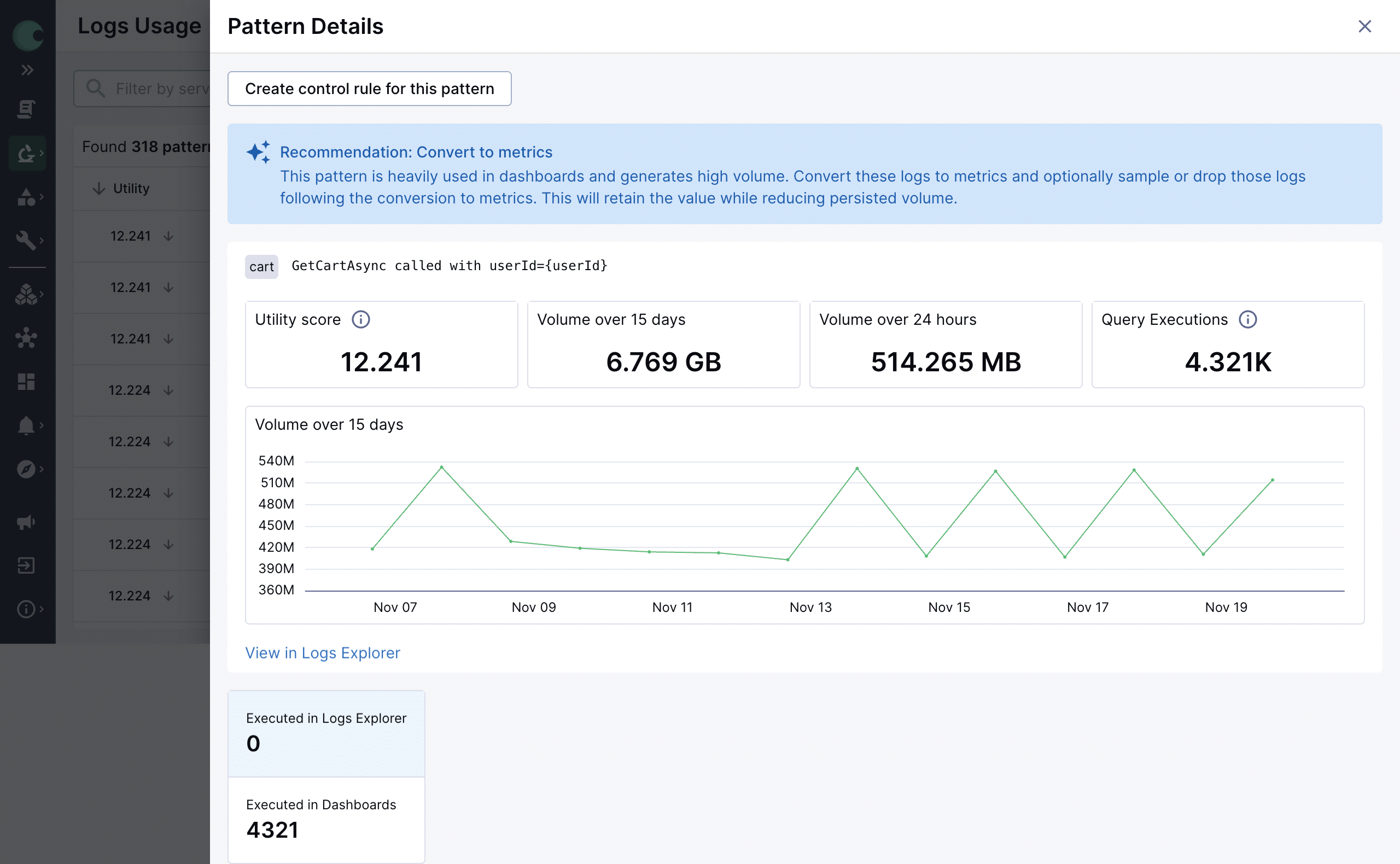
At launch, we provide five sophisticated options for Control Rules:
- Sample: Keep 1 of every N log entries for high-volume, repetitive logs where statistical sampling preserves the insights you need.
- Drop Logs: Remove log data that Utility Analysis confirms your team never queries.
- Drop Fields/Values: Remove fields or values within your log data that inflates data volume without adding value.
- Convert to Metrics: Extract the metrics you need upstream to power dashboards or alerts, then skip ingesting the underlying log data. Get the operational intelligence without the storage costs.
- Find and Replace: Remove noise and ensure consistency within your log data. Basic hygiene that compounds over time.
You apply the recommendation with one click. No custom pipelines. No agent configuration. No risk of breaking queries or dashboards.
As we get user feedback, we’ll continue adding to our Control Rules.
Available now
Chronosphere Logs Control Rules provides sophisticated transformations to help you minimize TCO. Instead of choosing between visibility and cost, you can:
-
- Extract specific metrics for alerting while archiving raw logs
- Store compliance data cheaply while keeping operational data hot
- Clean up noisy logs instead of dropping them entirely
If you use Chronosphere Logs, Control Rules is available now. Log in to see your personalized recommendations and start reducing costs.
Introducing: Chronosphere Control Rules
If you use Chronosphere Logs, Control Rules is now available. Log in to see your personalized recommendations and start reducing costs today.

 Blog
Blog