



Summary
When responding to active incidents, or doing general exploration, context switching between scattered communication tools slows down resolution and disrupts focus. Chronosphere Notebooks provide a persistent workspace directly alongside your telemetry data. By allowing teams to drag in live panels, lock data at full resolution, and share findings instantly, Notebooks simplify ad hoc analysis and collaborative troubleshooting.
The Friction of Formal Dashboards During Active Incidents
When investigating an anomaly, using shared dashboards for ad hoc troubleshooting introduces friction. Modifying a production dashboard to test a hypothesis risks disrupting other users, while building a temporary one wastes critical time and contributes to long-term dashboard sprawl.
To avoid this, engineers often bypass dashboards entirely, scattering charts and observations across disjointed chat threads and documents. This fragmentation kills collaborative efficiency and complicates post-incident reviews. Responders need a dedicated, low-pressure scratchpad to capture triage notes without breaking existing views or cluttering the system.
Maintain Context With a Persistent Troubleshooting Workspace
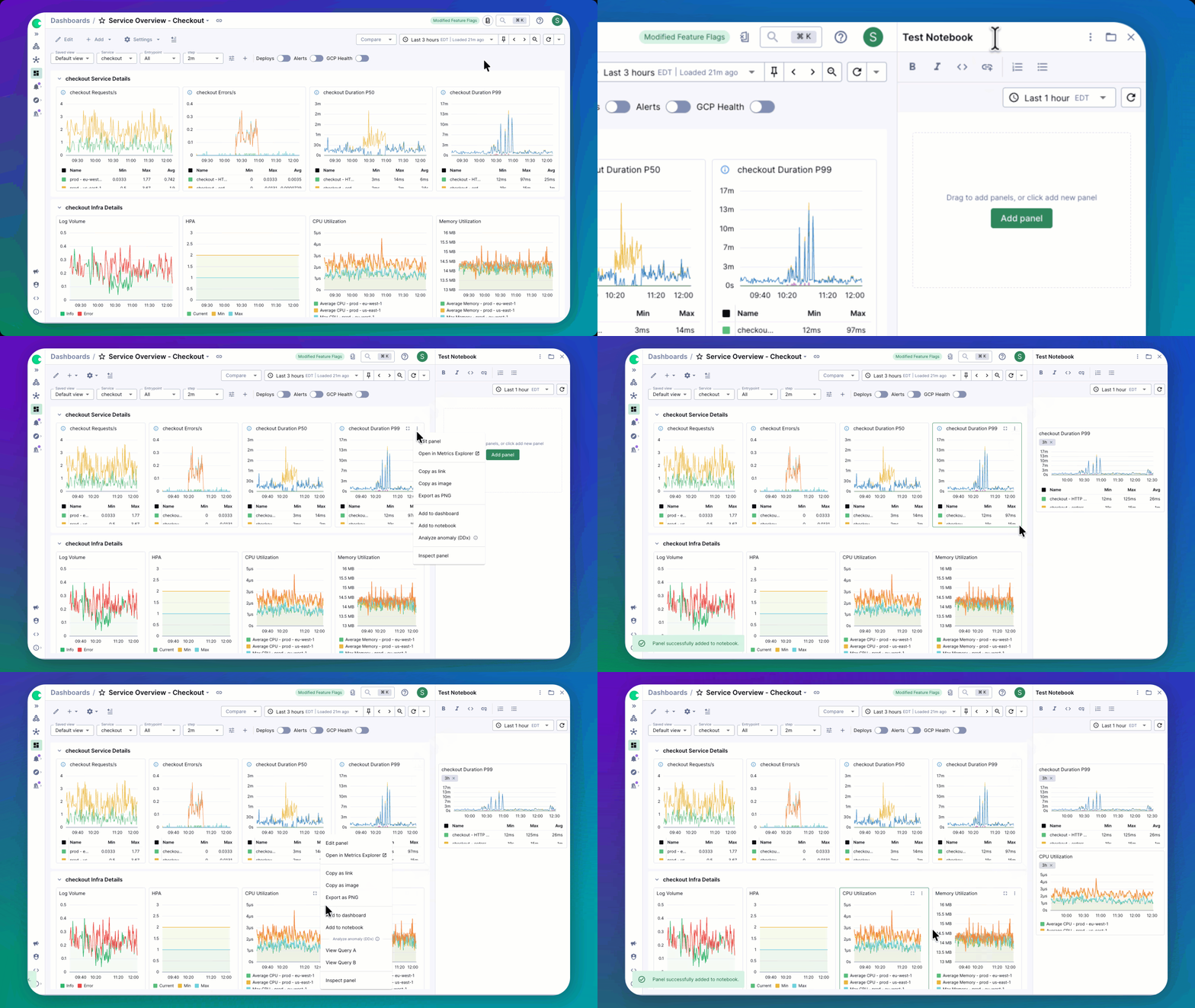
The Notebooks sidebar remains open as you navigate Chronosphere, providing a persistent workspace to compile relevant information without losing context. When you find something interesting, simply drag and drop panels from dashboards or telemetry explorers directly into your Notebook.
This allows you to combine panels from completely different dashboards into a single view. With synchronized crosshairs across all pulled panels, you can instantly align timeframes and visually correlate spikes across disparate services without configuring a formal dashboard.
Preserve Critical Data With Full-Resolution Snapshots
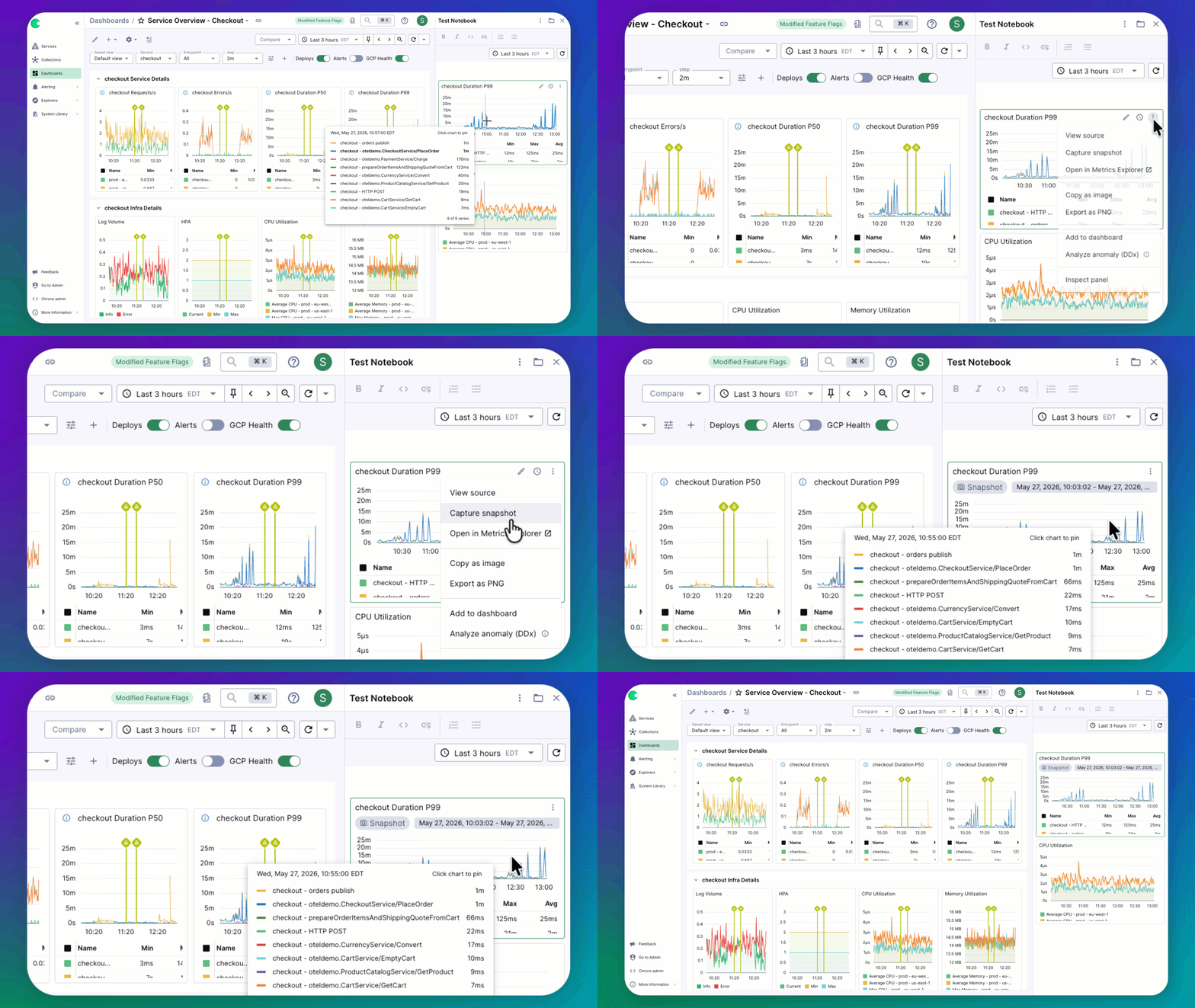
Telemetry data is typically downsampled over time, smoothing out the granular spikes and dips needed for accurate post-incident reviews. Notebooks solve this degradation problem with Data Snapshots.
When you add a panel to your workspace, you can choose to lock the chart to its original resolution. This captures the evidence exactly as it happened. When your team revisits the Notebook for a retrospective weeks later, the data retains its full, moment-in-time fidelity, completely protected against future downsampling.
Improve Incident Collaboration and Knowledge Sharing
During complex incidents, responders often share localized screenshots and query links in fast-moving chat channels. This fractured communication forces others to manually reconstruct the timeline, slowing down triage.
Notebooks replace this disjointed workflow with a shared workspace. Generate a URL to share findings instantly, allowing teammates to follow your reasoning, view captured telemetry, and add their own notes and panels. This keeps the entire team aligned on a single source of truth, making active troubleshooting and shift handoffs highly efficient.
Surface Past Learnings for Future Investigations
Post-incident knowledge often disappears into closed tickets or buried in chats, forcing future on-call engineers to investigate similar issues from scratch. Notebooks change this dynamic by turning troubleshooting efforts into reusable operational knowledge.
Once an investigation is complete, attach your Notebook directly to the relevant alert monitor. When that alert fires again, responders immediately have a documented path showing exactly what hypotheses were tested and how the issue was resolved, giving them a massive head start.
Start Troubleshooting With Notebooks
Active incidents require complete focus, and every context switch breaks that momentum. Chronosphere Notebooks remove the friction of jumping between scattered tools and formal dashboards. They give your team a dedicated space to investigate, share context, and capture evidence directly alongside your live telemetry.
Notebooks are generally available for all customers. Log in to Chronosphere to open your first workspace, or read through our documentation to learn how to fit them into your incident response workflow.
Not a Chronosphere customer? Reach out to our team to see how you can streamline your troubleshooting workflow.

 Blog
Blog