

Summary
The syntax tax of complex query languages like PromQL creates a steep learning curve that bottlenecks incident response. This friction slows down onboarding for new engineers and hinders those who only use observability tools infrequently. Chronosphere’s natural language queries eliminate this barrier. By translating plain English – as well as other languages – directly into valid PromQL and log syntax, anyone on the engineering team can easily query telemetry data, bypass syntax errors, and get immediate answers.
Eliminate the PromQL learning curve
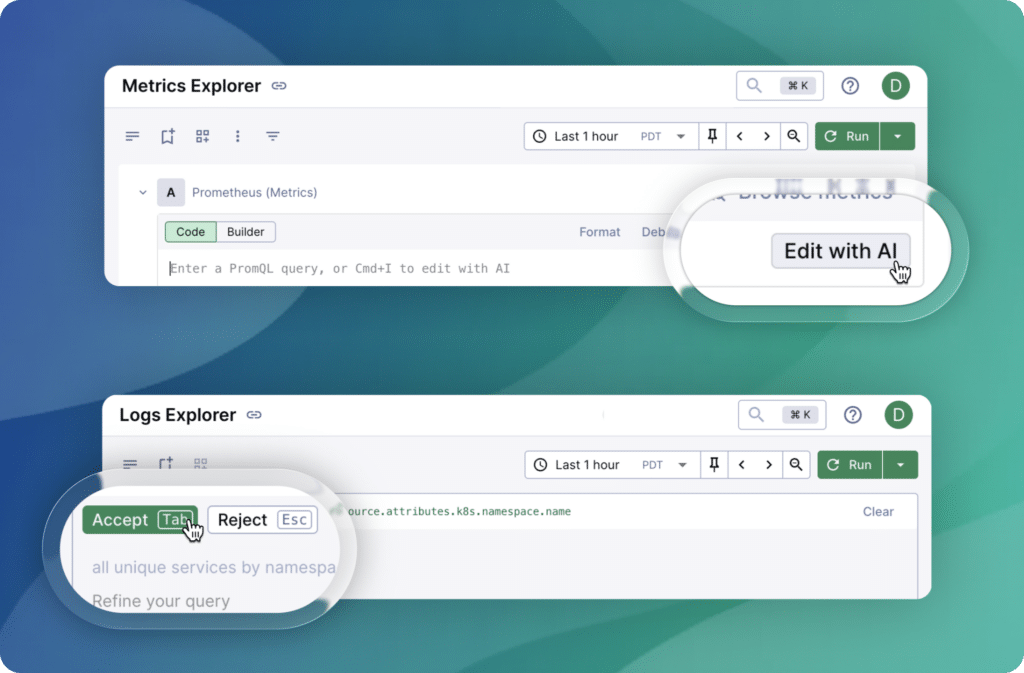
PromQL offers deep capabilities for metrics analysis, but its complexity frequently acts as a barrier to the underlying data. Even seasoned developers can struggle to recall the exact syntax for a histogram_quantile or how to properly format multiple label filters under pressure. This forces engineers to constantly switch contexts between the active investigation and query documentation. During a high-stakes incident, every second spent fighting syntax is time lost on actual resolution.
Natural language query generation solves this problem by taking your operational intent and instantly translating it into a valid PromQL statement. Instead of relying on trial-and-error debugging to build a query from scratch, you get an immediate, accurate starting point for complex investigations. This keeps your focus strictly on diagnosing system health and resolving the issue rather than wrestling with the query language itself.
Streamline log exploration
The difficulty of query syntax isn’t limited to metrics; log analysis frequently suffers from the same overhead. Finding the right log lines across different services often requires knowing specific search operators or field names that vary from one platform to another. This creates a “blank page” problem where an engineer knows the specific data they are looking for but is forced to spend time figuring out how the tool requires them to ask for it.
Natural language queries remove this friction by providing a consistent experience across telemetry types. You can simply ask the platform to filter for specific error codes or aggregate by metadata tags using plain English. This consistency ensures an uninterrupted workflow, allowing you to maintain your train of thought and find the root cause faster as you move from metrics to logs.
Refine Your Queries Conversationally
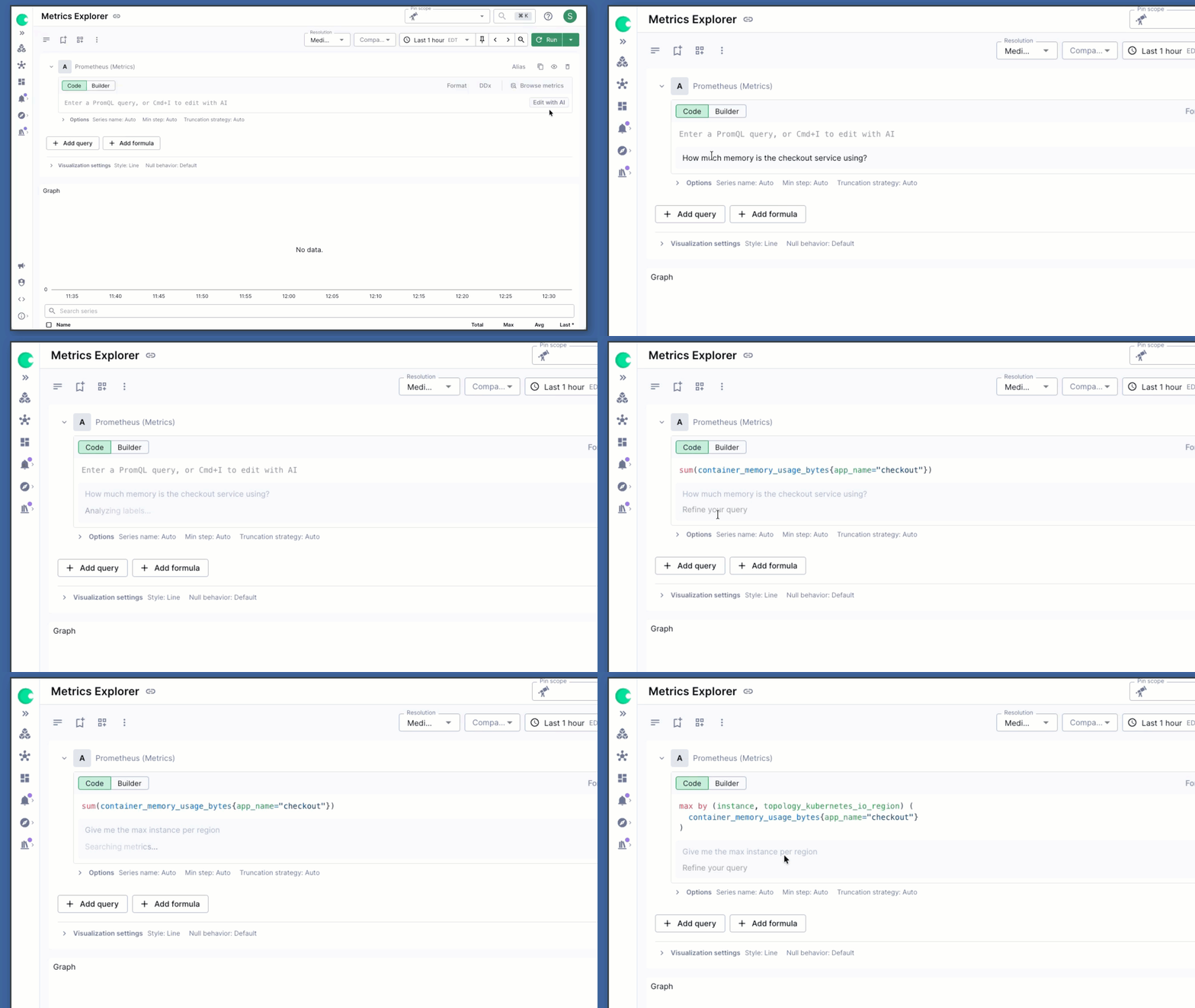
Rarely is a query perfect on the first attempt. Investigations evolve as new data surfaces, often requiring engineers to pivot their perspective or drill deeper into a specific subset of data. Typically, this means manually editing strings, adding brackets, or looking up regex patterns to narrow down a search.
The refinement capability allows for a conversational approach to data exploration. Once a base query is generated, it can be modified by simply providing further instructions in plain English—such as “now group this by region” or “only show results with a 500 status code.” This iterative process keeps the engineer in the flow of the investigation, allowing them to follow a trail of evidence without being interrupted by the mechanical requirements of the query language.
Ready to query your data naturally?
The days of debugging your own queries during an incident are over. With Chronosphere’s natural language queries, you can focus on resolving issues based on the data, not your memorization of syntax.
-
Accelerate onboarding: Allow new hires to query telemetry from day one.
-
Reduce cognitive load: Let the platform generate the PromQL and log syntax for you.
-
Maintain context: Move seamlessly across telemetries without changing your workflow.
Natural language queries are currently available for Chronosphere users. Reach out to your account team or book a demo to see how conversationally querying your data can speed up your incident response.
FAQs
What are natural language queries?
Natural language queries allow you to use plain English to search, filter, and analyze your telemetry data. Instead of writing and debugging complex code or specific platform syntax like PromQL, you simply type your operational intent—such as “show me the error rate for the checkout service”—and the platform automatically translates it into the correct query. This removes the learning curve and lets anyone on the team explore observability data instantly.
Do I need prior PromQL experience to use natural language queries?
No prior experience is necessary. The system takes your plain English intent and translates it directly into valid syntax. This allows new engineers or infrequent users to query data and troubleshoot issues from day one without spending time studying query documentation.
How do natural language queries improve incident response times?
During an outage, time spent formatting label filters or recalling specific search operators delays resolution. By automating the syntax generation, engineers receive an immediate, accurate starting point. This keeps the team entirely focused on analyzing system health and finding the root cause rather than debugging their own queries.

 Blog
Blog